Beautiful Photo
Printing Made Simple

Drag, drop, arrange, and print. The fastest way to get your photos from screen to paper with pixel-perfect layouts.

🖨️ Pro Printing
Lightweight
🔒 100% Offline
The Printer App
A4 Portrait 4 Images Import Print
🏔️
🌸
🌅
🐕

Everything You Need to Print

A complete photo printing solution packed into a fast, lightweight app.

🖼️

Smart Layouts

Automatically arrange up to 12 images per page with perfect grid layouts.

📄

Any Paper Size

Support for A4, Letter, Legal, and A3 in both portrait and landscape orientations.

🎨

Image Editing

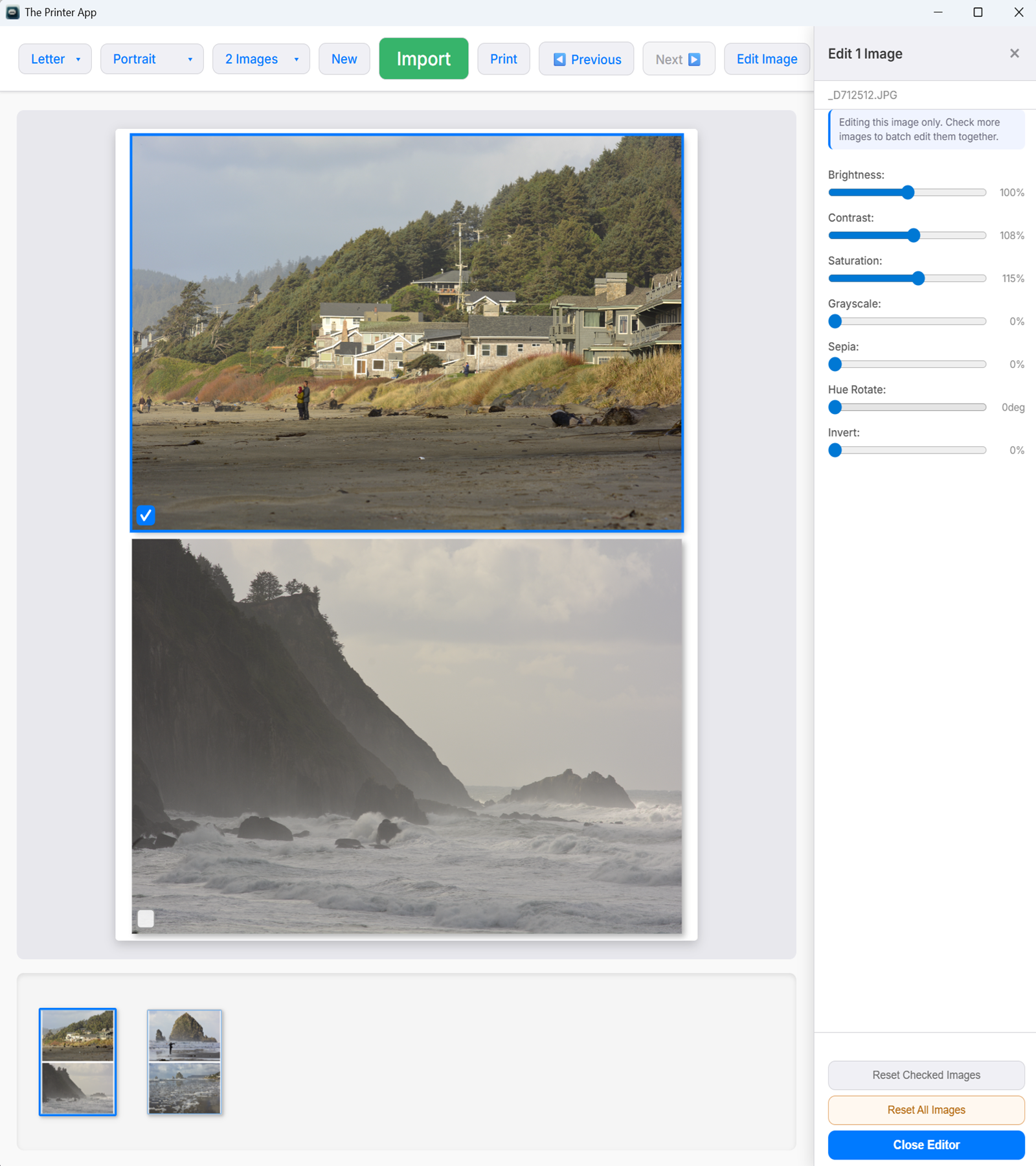
Adjust brightness, contrast, saturation, and apply filters like grayscale, sepia, hue rotate, and invert.

🔄

Transform & Flip

Rotate images 90/180/270 degrees and flip horizontally or vertically.

📐

Drag & Arrange

Drag images to reorder, swap positions, and move images between pages with intuitive drag-and-drop.

💾

Auto-Save & Recovery

Your work is automatically saved every 15 seconds. If the app closes unexpectedly, restore your session instantly on next launch.

📑

Multi-Page

Automatic pagination with page thumbnails. Drag images between pages effortlessly.

Fast & Native

Built with Tauri and Rust. Tiny footprint, instant startup, no bloat.

📷

RAW Format Support

Import camera RAW files directly — DNG, CR2, CR3, NEF, ARW, ORF, RW2, and RAF. Full RAW development with accurate demosaicing, white balance, and color correction.

🔒

Privacy First

100% offline. Your photos never leave your computer. No accounts, no cloud.

How It Works

From photos to prints in three simple steps.

1

Import Your Photos

Click Import or drag and drop your images onto the canvas. Supports JPG, PNG, WebP, BMP, GIF, AVIF, SVG, ICO, and camera RAW formats (DNG, NEF, CR2, ARW, and more).

2

Arrange & Edit

Choose your paper size and layout. Drag to reorder, rotate, flip, and fine-tune colors to your liking.

3

Print

Hit Print and you're done. Full-resolution images are sent directly to your printer with the layout you designed.

See It In Action

A clean, intuitive interface designed for getting your photos printed fast.

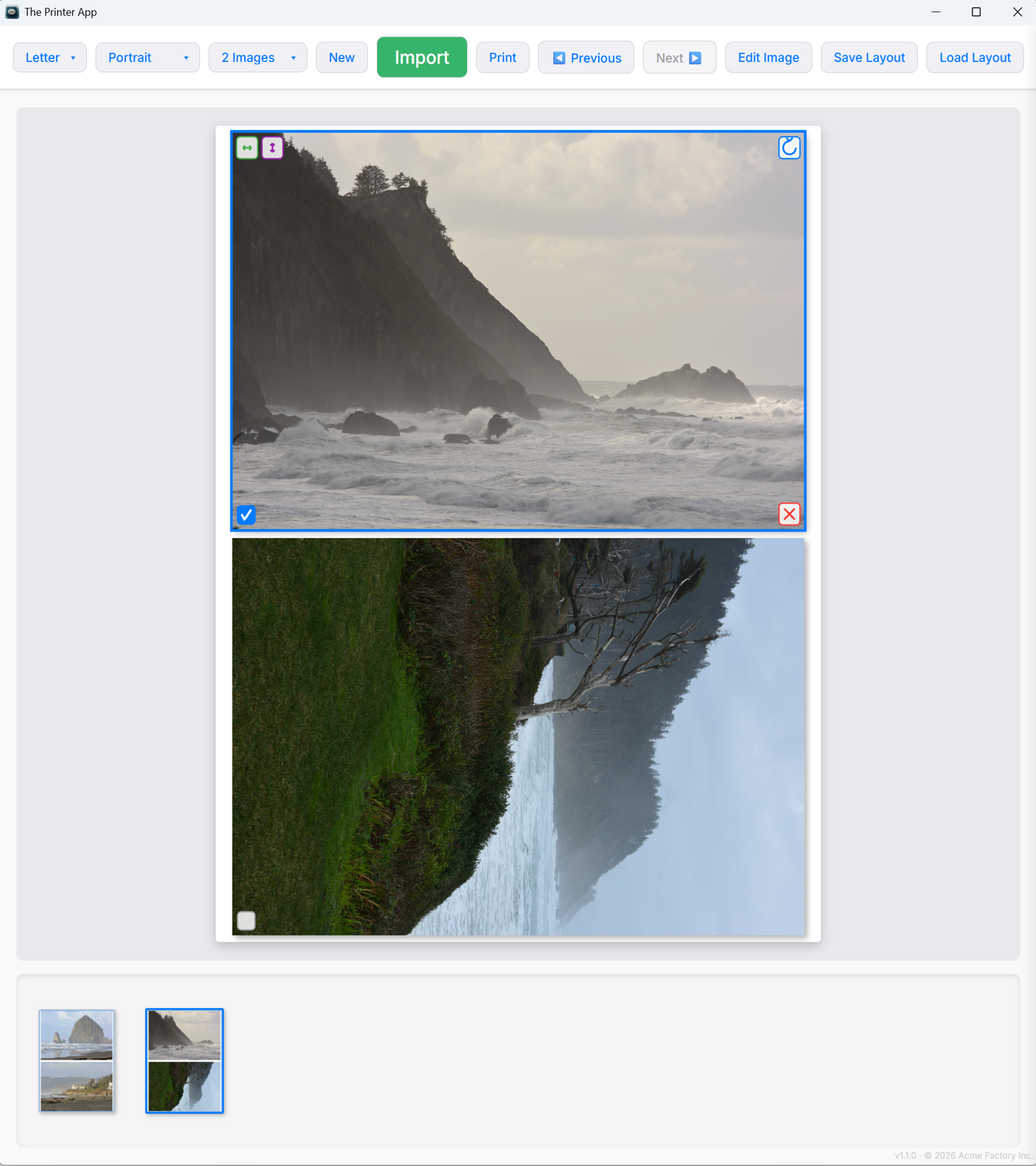
Real App The Printer App - Main canvas with photo layout

Layout Canvas

Drag and drop photos into customizable grid layouts. Choose paper size, orientation, and images per page.

Real App The Printer App - Image editing panel

Built-in Editor

Fine-tune brightness, contrast, saturation, and more. Rotate, flip, and apply filters without leaving the app.

🚀 Coming Soon

The Printer App is currently in development. Join the waitlist to be notified when we launch!

We'll only email you when The Printer App launches. No spam, ever.

What to Expect

✅ Free Download
✅ RAW Support
✅ No Account Required
✅ Windows 10/11